Open source AI Tools – Introduction
If you’re still relying only on paid AI tools, you might be missing a massive opportunity. Over the last few years, I’ve seen a powerful shift developers, data scientists, and even enterprises are moving toward open source AI tools not just for cost savings, but for control, flexibility, and innovation.
👉From my experience working in IT across multiple industries, one thing has always remained constant the tools you choose define how fast and how far you can grow.
What surprised me recently is how open source AI has matured. These are no longer “experimental tools.” They are production-grade, enterprise-ready, and often more powerful than closed systems.
So the real question is:
🚀Are you using the right AI tools or just the most popular ones?
In this guide, I’ll walk you through the most powerful open source AI tools every tech professional should know along with real-world insights you won’t find in typical listicles.
Table of Contents
What Are Open Source AI Tools and Why Do They Matter
Open source AI tools are software frameworks, libraries, or platforms whose source code is publicly available. This means anyone can use, modify, and distribute them freely.
📌 In Simple Words
Open source AI tools give you freedom + control + innovation without vendor lock-in.
Key features include:
• Transparency in algorithms
• Customization flexibility
• Community-driven development
• No licensing costs
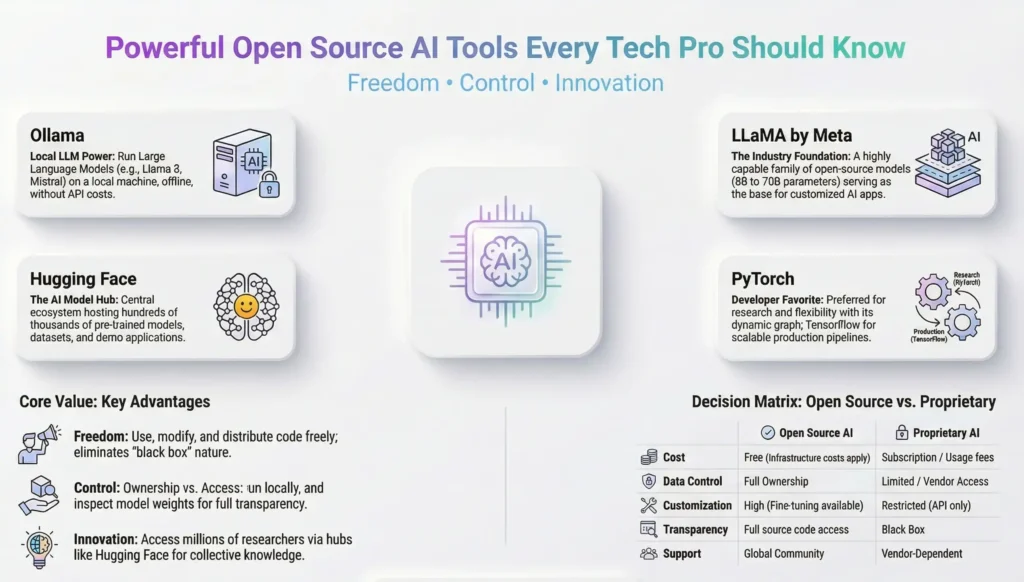
Open Source vs Proprietary AI – Key Differences
The distinction between open source and proprietary AI is not just about cost. It goes much deeper.
With proprietary AI tools think OpenAI’s API, Google Gemini’s enterprise tier, or certain Microsoft Copilot features you are accessing a service. You send data out, you receive a response back, and you have limited visibility into what happens in between. For many enterprise use cases, particularly in regulated industries like pharma or finance, that is a genuine problem. Data residency, explainability, and auditability are not optional — they are compliance requirements.
Open source AI tools flip that model. You run the software. You own the pipeline. You control the data. You can inspect the model weights, fine-tune on your own datasets, and deploy in environments that never touch the public internet.
| Factor | Open Source AI | Proprietary AI |
|---|---|---|
| Cost | Free (infra costs apply) | Subscription / usage fees |
| Data Control | Full | Limited |
| Customization | High | Restricted |
| Transparency | Full code access | Black box |
| Community Support | Large, active | Vendor dependent |
Why Tech Pros Are Choosing Open Source AI
The shift toward open source AI tools among tech professionals is not a trend — it is a structural change in how the industry thinks about building with AI.
Three reasons stand out from what I have observed across projects:
First, experimentation is free. In large enterprise projects, getting budget approval for a new SaaS tool can take weeks. With open source, a developer can spin up a local LLM over a weekend, test it against a real use case, and come back to the team with actual evidence. That changes the conversation entirely.
Second, the quality has caught up. A few years ago, open source models lagged significantly behind proprietary ones. That gap has closed dramatically. Models like Meta’s LLaMA, Mistral, and Falcon are delivering performance that competes with commercial offerings at a fraction of the cost.
Third, the community is extraordinary. When you are working with TensorFlow, PyTorch, or Hugging Face, you have access to millions of developers, researchers, and practitioners who have already solved the problem you are facing. That collective knowledge is genuinely invaluable.
Best Open Source AI Tools for Large Language Models
This is where things get exciting. The large language model space has been transformed by open source contributions over the last two years. What was once the exclusive domain of well-funded labs is now accessible to any developer with a decent laptop.
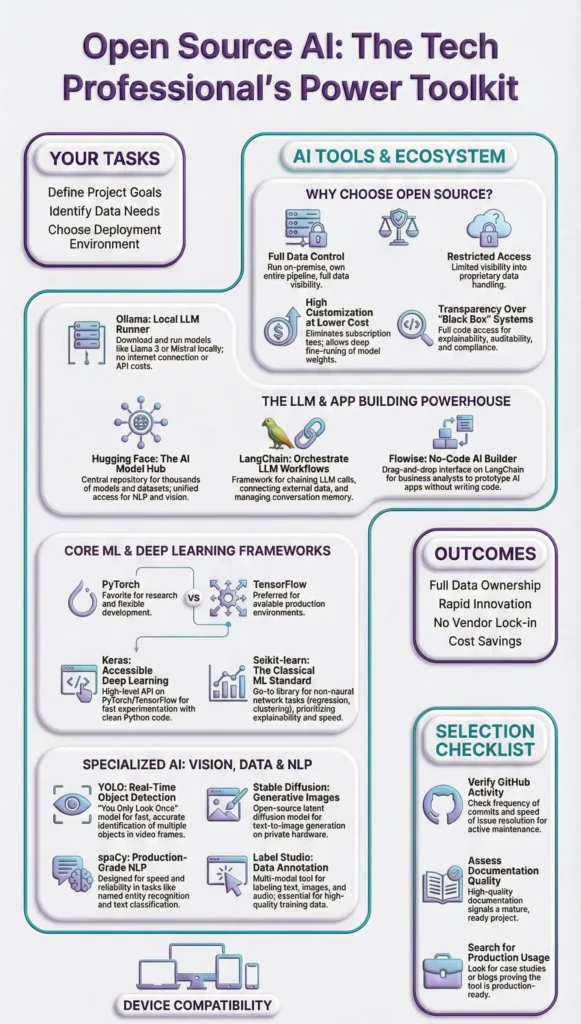
In this section i will explain in detail about all the open source tools listed below
Open Source AI Tools – Complete Reference Table
| Tool Name | Category | Official URL |
|---|---|---|
| Ollama | Local LLM Runner | https://ollama.com |
| LLaMA by Meta | Open Source LLM | https://ai.meta.com/llama |
| Hugging Face Transformers | AI Model Hub & Library | https://huggingface.co |
| TensorFlow | ML Framework | https://www.tensorflow.org |
| PyTorch | ML Framework | https://pytorch.org |
| Scikit-learn | Classical ML Library | https://scikit-learn.org |
| Keras | Deep Learning API | https://keras.io |
| LangChain | LLM App Framework | https://www.langchain.com |
| AutoGen by Microsoft | Multi-Agent AI Framework | https://microsoft.github.io/autogen |
| Flowise | No-Code LLM App Builder | https://flowiseai.com |
| spaCy | NLP Library | https://spacy.io |
| Apache Spark MLlib | Large Scale ML | https://spark.apache.org/mllib |
| Label Studio | Data Labeling Tool | https://labelstud.io |
| OpenCV | Computer Vision Library | https://opencv.org |
| Stable Diffusion | Generative AI — Image | https://stability.ai |
| YOLO by Ultralytics | Object Detection | https://ultralytics.com |
💎Ollama
Ollama ( Run LLMs Locally on Your Machine ) , If there is one open source AI tool I recommend to every tech pro I speak to right now, it is Ollama.
Ollama is a tool that allows you to download and run large language models directly on your local machine no internet connection required, no API calls, no usage costs, no data leaving your environment. You run a single command, pull a model like Llama 3, Mistral, or Phi-3, and start interacting with it through a local API or a simple command line interface.
What makes Ollama stand out is its simplicity. The installation is straightforward, the model library is growing rapidly, and it integrates easily with tools like LangChain and Open WebUI for a full chat interface experience.
Best for: Developers who need local LLM capability, privacy-sensitive enterprise use cases, and anyone who wants to experiment without cloud costs.
💎LLaMA
LLaMA by Meta (The Model That Changed the Game ) , when Meta released LLaMA (Large Language Model Meta AI), it fundamentally changed the open source AI landscape. For the first time, a model competitive with proprietary offerings was made available to the research and developer community under an open license.
LLaMA 3, the current generation at the time of writing, is available in multiple parameter sizes — from compact 8 billion parameter versions that run on a laptop to 70 billion parameter versions that require more serious compute. The model family supports instruction-following, coding, reasoning, and multilingual tasks with impressive capability.
📌 In Simple Words:
LLaMA by Meta is a family of open source language models that developers and organisations can download, run, and fine-tune on their own infrastructure. It is the foundation that many other open source tools and applications are built on top of.
💎Hugging Face
Hugging Face Transformers — The Open Source AI Hub
If LLaMA is the engine, Hugging Face is the garage where all the engines live. Hugging Face has become the central repository and platform for the open source AI community hosting hundreds of thousands of models, datasets, and demo applications.
The Hugging Face Transformers library is a Python framework that gives developers unified access to pre-trained models for natural language processing, computer vision, audio processing, and more. You can load a model, run inference, and fine-tune it on your own data with remarkably little code.
Beyond the model hub, Hugging Face also offers the Inference API (for quick hosted access), Spaces (for deploying demo applications), and AutoTrain (for no-code fine-tuning). It is an ecosystem, not just a library.
Best for: NLP tasks, model exploration, fine-tuning, and teams who want a managed platform experience with open source models.
Open Source AI Frameworks for Machine Learning and Deep Learning
These are the backbone of AI development.
• TensorFlow
• PyTorch
👉From my experience:
TensorFlow is great for production environments, while PyTorch is preferred for research and flexibility.
📌 In Simple Words
TensorFlow = Stability
PyTorch = Flexibility
💎TensorFlow
TensorFlow – Google’s Open Source ML Powerhouse.TensorFlow, released by Google in 2015, remains one of the most widely deployed machine learning frameworks in the world. It is production-grade, highly scalable, and has deep integration with Google Cloud infrastructure but it runs perfectly well on-premise too.
What makes TensorFlow particularly valuable in enterprise contexts is TensorFlow Extended (TFX), its end-to-end platform for deploying production ML pipelines. From data validation to model training to serving TFX gives you the structure to operationalise ML models in a governed, repeatable way.
TensorFlow Lite extends this to mobile and edge deployment, which has become increasingly relevant as enterprise AI moves closer to the point of operation.
Best for: Production ML deployments, teams with Google Cloud infrastructure, and enterprise environments requiring scalable ML pipelines.
💎PyTorch
PyTorch -The Developer Favorite for Research and Production
If TensorFlow is the enterprise workhorse, PyTorch is the developer darling. Originally developed by Meta’s AI research lab, PyTorch has become the dominant framework in AI research and increasingly in production deployment as well.
What developers love about PyTorch is its dynamic computation graph, which makes debugging and experimentation far more intuitive than TensorFlow’s earlier static graph approach. You write Python the way you normally would, and the framework behaves accordingly. That significantly reduces the cognitive overhead of model development.
📌 In Simple Words:
PyTorch is an open source machine learning framework that lets developers build and train AI models using Python in a natural, flexible way. It is used by most AI research labs and is increasingly the framework of choice for production AI development across the industry.
PyTorch also benefits from an enormous ecosystem of extensions including PyTorch Lightning for structured training code, TorchServe for model serving, and deep integration with Hugging Face Transformers.
💎Scikit-learn
Scikit-learn – Lightweight ML for Practical Applications.Not every AI problem requires a neural network. This is something I genuinely wish more teams understood before reaching for a heavy LLM to solve a problem that a well-tuned classification model could handle in milliseconds.
Scikit-learn is the go-to Python library for classical machine learning covering everything from regression and classification to clustering, dimensionality reduction, and model evaluation. It is mature, extremely well-documented, and integrates naturally with the broader Python data science stack (NumPy, pandas, Matplotlib).
Best for: Classical ML tasks, teams building interpretable models, and any scenario where model explainability is a requirement.
💎Keras
Keras – The Deep Learning API That Makes Neural Networks Accessible
If PyTorch is the developer’s framework and TensorFlow is the enterprise workhorse, Keras is the bridge that made deep learning accessible to everyone in between. Keras is a high-level deep learning API written in Python that allows developers to build, train, and deploy neural network models with remarkably clean, readable code — without needing to understand every low-level operation happening underneath.
Originally developed by François Chollet at Google and released in 2015, Keras was designed around one core philosophy: enable fast experimentation. The API is intentionally simple and consistent — you define a model, compile it, fit it to data, and evaluate it. The learning curve that once kept deep learning confined to research labs dropped significantly the moment Keras arrived.
From Keras 3 onwards, the framework became truly multi-backend — meaning the same Keras code can run on top of TensorFlow, PyTorch, or JAX. That is a significant architectural decision for enterprise environments. You write your model once in Keras and switch the backend based on your deployment requirements without rewriting your code.
Keras integrates naturally with the broader TensorFlow ecosystem including TensorFlow Extended (TFX) for production ML pipelines, TensorFlow Serving for model deployment, and TensorFlow Lite for edge and mobile deployment. Its Keras Tuner extension adds automated hyperparameter search, and KerasCV and KerasNLP provide specialised high-level APIs for computer vision and natural language processing tasks respectively.
📌 In Simple Words:
Keras is a high-level open source deep learning library that lets developers build powerful neural network models using clean, simple Python code. It sits on top of frameworks like TensorFlow and PyTorch, handling the complexity underneath so you can focus on designing and training your model rather than low-level implementation details.
Best for: Teams building neural network models who want clean, readable code with fast experimentation cycles; data scientists collaborating with ML engineers across mixed framework environments; and any project where TensorFlow is the production backend but rapid model development is a priority.
Open Source AI Tools for Building AI-Powered Applications
Knowing which models and frameworks exist is one thing. Building production applications on top of them is another. This category of open source AI tools bridges that gap.
💎LangChain
LangChain – Orchestrate LLMs with Ease.LangChain is the framework that made building LLM-powered applications accessible to developers who are not AI researchers. It provides abstractions for chaining together LLM calls, connecting models to external data sources, managing conversation memory, and building agents that can use tools.
The use cases LangChain enables are broad: document Q&A systems, conversational agents, automated research workflows, code review assistants, and multi-step reasoning pipelines. What used to require significant custom engineering can now be assembled from LangChain’s composable building blocks.
📌 In Simple Words:
LangChain is an open source framework for building applications powered by large language models. It handles the plumbing — connecting models to data, managing context, and chaining together complex workflows — so developers can focus on the application logic.
Best for: Developers building document Q&A systems, AI assistants, agentic workflows, and any LLM-powered application requiring external data integration.
💎AutoGen
AutoGen by Microsoft – Multi-Agent AI Workflows.AutoGen represents the next evolution beyond simple LLM chains multi-agent AI systems where multiple AI agents collaborate, debate, and check each other’s work to solve complex tasks.
Released by Microsoft Research as an open source framework, AutoGen lets developers define multiple AI agents with different roles a coder, a critic, a planner, a human proxy and orchestrate them to work together on problems that exceed the capability of a single model call.
The practical applications are genuinely compelling: automated code generation and review workflows, research synthesis pipelines, and complex reasoning tasks that benefit from multiple perspectives.
Best for: Advanced developers building complex AI workflows, research automation, and enterprise teams exploring agentic AI architectures.
💎Flowise
Flowise – No-Code LLM App Builder.Not every valuable AI application needs to be built by a developer writing Python. Flowise is an open source, self-hostable, drag-and-drop interface for building LLM-powered applications without writing code.
Built on top of LangChain, Flowise provides a visual canvas where you can connect components LLMs, vector stores, document loaders, memory modules, and tools to build sophisticated AI applications through a browser-based interface.
Best for: Business analysts, citizen developers, teams that want to prototype LLM applications quickly without deep coding, and organisations wanting self-hosted AI application infrastructure.
Open Source AI Tools for Data, Analytics, and NLP
AI is only as good as the data pipeline behind it. This section covers the open source tools that handle the data-intensive, language-understanding layer of AI work.
💎spaCy
spaCy is a production-grade natural language processing library for Python. While transformer-based LLMs get most of the attention today, spaCy remains the tool of choice for many enterprise NLP pipelines that require speed, reliability, and explainability.
spaCy excels at named entity recognition, dependency parsing, part-of-speech tagging, text classification, and building custom NLP pipelines. It is designed for production not research experimentation and its performance on structured NLP tasks is hard to beat.
Best for: Structured NLP tasks, information extraction, production NLP pipelines, and any use case where speed and explainability matter more than raw generative capability.
💎Apache Spark MLlib
Apache Spark MLlib ,When your data volumes exceed what fits in memory on a single machine, you need a distributed computing solution. Apache Spark’s MLlib is the machine learning library built into the Spark ecosystem enabling ML at massive scale across distributed clusters.
MLlib provides implementations of common ML algorithms classification, regression, clustering, collaborative filtering, and dimensionality reduction designed to run on datasets that range from
Best for: Large-scale data environments, telecom, retail, and any enterprise generating data at a volume that exceeds single-machine processing capacity.gigabytes to petabytes.
💎Label Studio
Label Studio – Open Source Data Labeling.One aspect of AI development that rarely gets the attention it deserves is data labeling. Machine learning models need labeled training data, and creating high-quality labeled datasets is one of the most time-consuming and expensive parts of building custom AI solutions.
Label Studio is an open source data annotation tool that supports labeling across modalities text, images, audio, video, and time series. It provides a clean web interface for annotation tasks, supports multiple labelers with quality review workflows, and integrates with ML backends for active learning.
Best for: Teams building custom ML models that require proprietary training data, organizations with domain-specific labeling needs, and any AI project where data quality is a first-class concern.
Open Source AI Tools for Computer Vision and Generative AI
This is where things get genuinely exciting and where I have seen some of the most jaw-dropping demonstrations of what open source AI is capable of when you put it in the hands of developers who know what they are doing.
Computer vision and generative AI represent two of the fastest-moving areas in the entire AI landscape. And the open source community has not just kept pace with proprietary offerings here in several cases, it has outright led the way. The three tools I am covering in this section are ones that any tech professional serious about AI needs to understand, whether or not computer vision is your primary domain.
💎OpenCV
OpenCV -The Foundation of Computer Vision.If you have ever worked on any project involving image processing, video analysis, object detection, or camera-based automation, you have almost certainly encountered OpenCV even if you did not know it at the time.
OpenCV (Open Source Computer Vision Library) has been around since 1999, making it one of the oldest and most battle-tested libraries in the open source AI ecosystem. Originally developed by Intel, it is now maintained by a global community and used by everyone from individual developers to robotics companies to major enterprises running real-time video analytics at scale.
What OpenCV provides is a comprehensive toolkit for working with visual data image filtering, edge detection, object tracking, facial recognition, optical flow analysis, camera calibration, and much more. It supports Python, C++, and Java, runs on everything from Raspberry Pi to enterprise servers, and integrates naturally with deep learning frameworks like PyTorch and TensorFlow for building end-to-end vision pipelines.
📌 In Simple Words:
OpenCV is the open source library that gives software the ability to see and interpret visual information images, video feeds, and camera input. It is the starting point for almost any computer vision project, from basic image processing to complex real-time object detection systems.
Best for: Any project involving image or video processing, real-time visual analysis, camera-based automation, and computer vision pipelines in production environments.
💎Stable Diffusion
Stable Diffusion – Generative AI for Images, Open and Controllable.When Stable Diffusion was released publicly in 2022, it changed the generative AI conversation permanently. For the first time, a genuinely capable AI image generation model was available for anyone to download, run locally, and build upon no API, no subscription, no data sent to a third-party server.
Stable Diffusion is a latent diffusion model that generates high-quality images from text descriptions (text-to-image), modifies existing images based on prompts (image-to-image), and fills or extends images intelligently (inpainting and outpainting). The base models are open source, the weights are publicly available, and a vast community ecosystem of fine-tuned variants, extensions, and interfaces has grown around it.
Tools like Automatic1111’s Web UI and ComfyUI provide accessible browser-based interfaces for working with Stable Diffusion without writing code. For developers who want programmatic control, the Diffusers library from Hugging Face provides a clean Python API that integrates Stable Diffusion into any application pipeline.
📌 In Simple Words:
Stable Diffusion is an open source generative AI model that creates, edits, and transforms images from text descriptions. Unlike cloud-based image generators, it can be run entirely on your own hardware — giving organisations full control over their data, their outputs, and their creative workflows.
Best for: Media and entertainment teams, marketing and creative departments, computer vision teams needing synthetic training data, and any organisation requiring controllable on-premise image generation.
💎YOLO
YOLO by Ultralytics – which stands for You Only Look Once — is one of the most influential innovations in computer vision history. The name describes its core insight: rather than scanning an image multiple times with a sliding window (as earlier detection approaches did), YOLO looks at the entire image once and predicts bounding boxes and class probabilities simultaneously. The result is object detection that is fast enough to run in real time.
The YOLO family of models has evolved significantly since the original research paper. The current generation — YOLOv8 and YOLOv9, developed by Ultralytics — delivers exceptional detection accuracy at speeds that make real-time video analysis genuinely practical, even on edge hardware without enterprise-grade GPUs.
What YOLO detects is configurable: people, vehicles, animals, products, defects, safety equipment essentially any visual category for which you have training data. The model can be fine-tuned on custom datasets relatively quickly, making it adaptable to highly specific enterprise use cases.
📌 In Simple Words:
YOLO is an open source real-time object detection model that identifies and locates multiple objects within an image or video frame in a single pass. It is fast, accurate, highly customisable, and widely deployed in production environments across retail, manufacturing, automotive, and security industries.
Best for: Real-time object detection, video analytics, manufacturing quality inspection, retail analytics, safety monitoring, and any application where speed and accuracy of visual detection are both critical requirements.
How to Choose the Right Open Source AI Tool for Your Use Case
With this many tools available, the question is not whether there is an open source AI tool for your problem. The question is which one fits your context, your team, and your constraints.
Matching Tools to Project Requirements
The first filter is use case clarity. Before evaluating any tool, be specific about what you are trying to accomplish.
Are you building a conversational application on top of internal documents? LangChain with Ollama or a Hugging Face model is likely your starting point.
Are you training a custom classifier on proprietary data? Scikit-learn for classical ML or PyTorch with Hugging Face fine-tuning for deep learning approaches.
Are you processing structured information from large document volumes? spaCy for rule-based NLP, or a fine-tuned Hugging Face model for more complex extraction.
Are you operating at massive data scale? Apache Spark MLlib for distributed ML. Are you a non-developer who needs to prototype quickly? Flowise gives you a no-code path.
Community Support and Maintenance – What to Check Before Committing
Open source quality varies enormously, and committing to a tool that is poorly maintained or has a shrinking community can create significant technical debt.
Before adopting any open source AI tool in a project context, check four things:
🚩GitHub activity
When was the last commit? Is the issue tracker active? Are pull requests being reviewed and merged? A stale repository is a risk.
🚩Documentation quality
Can you find answers to your questions without reading the source code? Good documentation signals a mature, community-focused project.
🚩Community size
How active is the Slack, Discord, or forum? For tools like Hugging Face, PyTorch, and LangChain, community support is genuinely excellent. For newer or less popular tools, you may be on your own.
🚩Production usage evidence
Are large organisations publicly using this in production? Case studies, blog posts, and conference talks from enterprise users are strong signals of production readiness.
🎯Conclusion
The open source AI ecosystem has matured to a point where tech professionals have no excuse to remain dependent on proprietary tools for every use case. The tools covered in this guide from Ollama’s local LLM capability to Hugging Face’s vast model library, from PyTorch’s developer-friendly framework to LangChain’s LLM orchestration, from spaCy’s production NLP to Label Studio’s data labeling infrastructure represent the practical, proven toolkit of modern AI development.
If you are just starting to explore open source AI tools, my recommendation is this: pick one tool from this list that maps to a real problem you are currently facing. Not a theoretical future use case an actual problem you are dealing with right now. Install it. Get it running. Break something. Fix it. That hands-on experience is worth more than any amount of reading.
The democratisation of AI is happening through open source. The developers, analysts, and tech professionals who engage with these tools now are building the skills and the instincts that will define the next decade of enterprise technology. Start today.
FAQ
❓What are the best open source AI tools for developers in 2026?
The strongest open source AI tools for developers right now include Ollama for local LLM deployment, Hugging Face Transformers for model access and fine-tuning, LangChain for building LLM-powered applications, PyTorch for deep learning development, and spaCy for production NLP pipelines. The right choice depends on your specific use case and infrastructure requirements.
❓Can open source AI tools match the performance of paid AI platforms?
In many use cases, yes. Open source models like Meta’s LLaMA 3 and Mistral deliver performance competitive with commercial offerings for a wide range of tasks. For specialised or cutting-edge capabilities, proprietary platforms may still have an edge — but the gap has closed significantly, and open source tools offer advantages in data control, customisation, and cost that proprietary platforms cannot match.
❓What is the best open source AI tool for running LLMs locally?
Ollama is currently the simplest and most accessible tool for running large language models locally. It supports a wide range of models including Llama 3, Mistral, Phi-3, and others, runs on standard consumer hardware, and provides a local API that integrates with tools like LangChain and Open WebUI. Installation takes minutes and the experience is remarkably smooth for a local deployment.
❓Which open source AI framework is best for beginners
TensorFlow or PyTorch? For most beginners entering AI development today, PyTorch is the recommended starting point. Its dynamic computation graph, Pythonic design, and extensive documentation make it more approachable than TensorFlow. It is also the dominant framework in academic research, meaning learning resources are abundant. TensorFlow becomes more relevant when deploying production ML pipelines, particularly in Google Cloud environments.
❓Are open source AI tools safe to use in enterprise environments?
Yes, with appropriate architecture and governance. Open source AI tools are widely used in enterprise environments including highly regulated industries like pharma and finance. The key advantages for enterprise use are data control, the ability to audit model behaviour, and deployment in private or air-gapped infrastructure. The safety considerations are the same as any software adoption: evaluate the tool’s maintenance status, security track record, and compliance with your organisation’s data governance requirements.
About the Author
I am a seasoned IT professional with over two decades of experience spanning roles from junior programmer to project manager in a multinational technology organisation.
I write to share practical, experience-grounded perspectives on technology that actually holds up in the real world .My goal is to help tech professionals cut through the noise, build genuine capability, and make decisions that serve their projects, their teams, and their careers.
Thank you for being part of my journey.
Also visit my blog 👉 10 Powerful AI Tools That Will Boost Your Productivity for detailed insites on this topic.