
ChaGPT Prompt for Project Managers – Introduction
What if I told you that the difference between a stressed project manager and a highly productive one these days is just… how they talk to AI?
Having spent decades in projects across industries from telecom to pharma and I can confidently say this: tools don’t create success, how you use them does. Today, with AI like ChatGPT, the real power lies in prompts. The right prompt can save hours, eliminate confusion, and even prevent project failure.
👉From my experience working in IT, I’ve seen teams struggle not because of lack of tools—but because of lack of clarity.
And that’s exactly where ChatGPT Prompts for Project Managers become a game-changer.
In this guide, I am going to share the exact prompts I use and recommend built from real experience across the projects that i have worked on recently.
Table of Contents
What Makes a Good ChatGPT Prompt for Project Managers
Before we get into the actual prompts, I want to spend a moment on something most articles skip entirely what separates a prompt that wastes your time from one that genuinely delivers.
I went through this learning curve myself. Early on, I was typing things like “help me with my project” and getting responses so generic they were useless. It took real experimentation on live project work before I understood the mechanics of what makes a prompt work.
The Difference Between Vague and High-Output Prompts
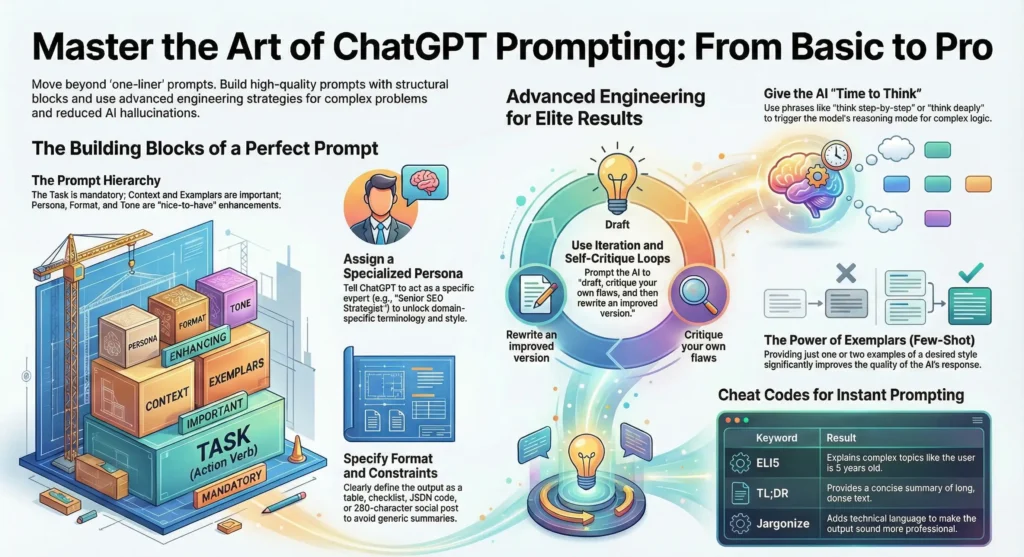
A vague prompt gives ChatGPT no context, no role, no constraints, and no output format. A high-output prompt does all four.
Here is the contrast:
Vague: “Write a project status update.”
High-output: “You are a senior project manager. Write a concise project status update for a legacy Java modernisation project. The project is 60% complete, two weeks behind schedule due to third-party API delays. The audience is a non-technical executive sponsor. Use bullet points. Keep it under 150 words.”
👉 From my experience, the single biggest shift in my prompt quality came when I started treating ChatGPT like a very capable new team member who needs a clear brief not a search engine that reads minds.
The more context you give, the more useful the output. Role, audience, format, constraints, tone these five elements transform a mediocre prompt into a high-output one every time.
How to Structure Prompts for Project Management Tasks
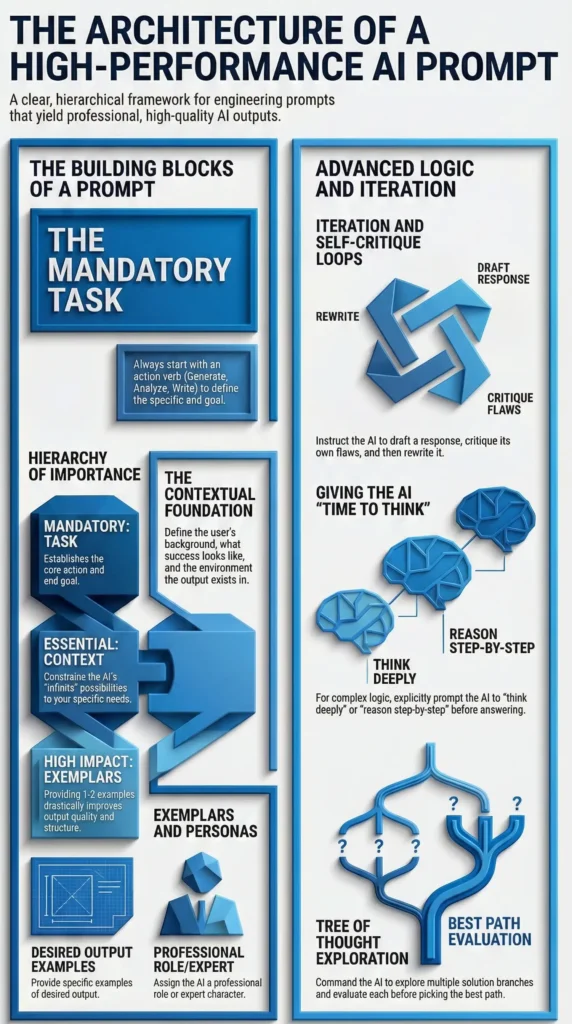
Use this simple five-part structure for almost any project management prompt:
- Role — “You are an experienced project manager…”
- Context — “The project involves a retail ERP migration with 12 stakeholders…”
- Task — “Write a risk register for the data migration phase…”
- Format — “Use a table with columns for Risk, Likelihood, Impact, and Mitigation…”
- Constraint — “Keep it to the top 8 risks. Use formal business language.”
📌 In Simple Words:
Think of a great prompt like a good project brief. Ambiguous briefs produce poor deliverables. Clear briefs produce results. The same principle applies to AI.
ChatGPT Prompts for Project Planning and Scope Definition
Project planning is where most projects are won or lost — and it is also where the volume of documentation work is highest. This is where ChatGPT becomes a genuine productivity multiplier.
Prompts for Creating a Project Charter
A project charter is often the first formal document in any project. It sets scope, objectives, stakeholders, and constraints. Writing one from scratch takes time. Using ChatGPT to build a first draft takes minutes.
💡Try this prompt:
“You are a senior project manager. Create a project charter for a customer data platform migration project in a mid-size retail company. The project involves moving customer transaction data from a legacy SQL Server database to a cloud-based Azure data warehouse. Timeline is six months. Key stakeholders include the CTO, Head of Retail Operations, and Data Analytics team. Format it with sections for: Project Objective, Scope, Out of Scope, Key Stakeholders, Milestones, Risks, and Approval.”
Prompts for Breaking Down a Project into Milestones and Tasks
Work breakdown structure is critical and tedious to generate manually when you are working across multiple workstreams.
💡Try this prompt:
“You are a project manager delivering a mobile app redesign project for a telecom client. The project has a nine-month timeline. Break this down into phases and milestones. For each milestone, list the key tasks required. Include phases for: Discovery, Design, Development, UAT, and Go-Live. Present this as a structured table.”
This gives you a working WBS framework in under thirty seconds. Refine from there.
📌 In Simple Words:
ChatGPT cannot replace your judgment on what the right milestones are for your specific project. But it can give you a strong structured starting point that you then adapt which is exactly how experienced project managers should use it.
ChatGPT Prompts for Stakeholder Communication
If there is one area where ChatGPT saves project managers the most time and arguably delivers the most value it is stakeholder communication. The volume of emails, status updates, and escalation messages in a typical enterprise project is enormous.
Drafting Status Update Emails and Executive Summaries
This is the use case that made me a genuine convert to AI-assisted project management communication.
💡Try this prompt:
“You are a project manager writing a weekly status update email for an executive sponsor who is non-technical. The project is a Kafka messaging system integration in a automobile client environment. This week: development is on track, but a vendor dependency has pushed UAT back by one week. The overall project is still within the approved timeline buffer. Write a clear, professional status update in under 200 words. Use traffic light status: Amber overall. Include: Summary, Progress This Week, Issues and Risks, Next Steps.”
The output you get will be clear, professional, and ready to review in a fraction of the time it would take to write from scratch.
Managing Difficult Stakeholder Conversations with AI Assistance
This is a use case most people do not talk about and it is one of the most practically valuable.
Difficult stakeholder conversations scope disputes, missed deadlines, budget overruns require careful, measured language. ChatGPT can help you draft the right tone.
💡Try this prompt:
“You are a project manager. A key client stakeholder has sent an aggressive email blaming the project team for a missed milestone. The delay was caused by late sign-off from the client’s own legal team, not the project team. Write a professional, firm, and diplomatic response that acknowledges the concern, clarifies the factual record, and proposes a revised timeline. Avoid being defensive. Keep it under 250 words.”
📌 In Simple Words:
ChatGPT will not fight your battles for you. But it will help you choose your words carefully when the pressure is on which is exactly when clear, professional communication matters most.
ChatGPT Prompts for Risk Management and Issue Tracking
Risk management is a core discipline of project management and also one of the most documentation-heavy. Generating risk registers, mitigation plans, and issue logs from scratch is time-consuming. ChatGPT handles this well when given proper context.
Identifying Risks Using AI-Driven Scenario Prompts
💡Try this prompt:
“You are a senior risk manager on an enterprise IT project. The project involves migrating a legacy Java Struts application to a modern microservices architecture on AWS. The client is in the pharmaceutical sector with strict data compliance requirements. Identify the top ten project risks across: technical, integration, compliance, resource, and vendor categories. For each risk, provide a brief description.”
Generating Mitigation Plans and Risk Registers
Once you have your risk list, extend the prompt:
“For each of the ten risks identified above, generate a mitigation strategy and an owner role (not a specific person use role titles). Present this as a structured risk register table with columns: Risk ID, Risk Description, Category, Likelihood (High/Medium/Low), Impact (High/Medium/Low), Mitigation Strategy, Owner Role, Status.”
This gives you a complete working risk register in a format you can immediately paste into your project documentation.
📌 In Simple Words:
A risk register generated by ChatGPT is not a final document — it is an exceptionally good first draft. Your expertise is what turns that draft into a project management asset that actually reflects your project’s reality.
ChatGPT Prompts for Team Productivity and Meeting Management
Meetings are one of the largest time sinks in project management. And the documentation that surrounds them agendas, minutes, action items, follow-up messages multiplies the time cost further. This is where ChatGPT delivers daily, practical value.
Creating Agendas and Summarising Meeting Notes
For agenda creation, try this prompt:
“You are a project manager facilitating a weekly project review meeting. The meeting involves: the development lead, the QA lead, the client business analyst, and the project sponsor. Topics to cover: sprint progress, open defects, UAT readiness, and upcoming release planning. Write a structured agenda with time allocations for a sixty-minute meeting. Include a five-minute buffer for open questions.”
For meeting summarisation, paste your raw notes into ChatGPT and use:
“Summarise the following meeting notes into a structured meeting summary. Include: Attendees, Key Decisions Made, Action Items (with owner role and due date), and Open Questions. Format clearly with headings. [Paste raw notes here]”
Writing action item trackers and follow-up messages
After a meeting, follow-up is critical. Try this prompt:
“Based on the following action items from today’s meeting, write a professional follow-up email to the project team. Summarise the agreed actions, owners, and due dates. Use a warm but clear tone. Make it concise under 150 words. [Paste action item list here]”
📌 In Simple Words:
The goal is not to let ChatGPT run your meetings. The goal is to let it handle the documentation burden so you can spend your ene
Advanced Prompt Strategies for Senior Project Managers
Once you have the basics working, the real productivity gains come from more sophisticated prompting techniques. These are the strategies I use for complex, multi-workstream enterprise projects.
Chaining Prompts for Complex Project Scenarios
Prompt chaining means using the output of one prompt as the input for the next. This allows you to build complex deliverables in structured steps rather than trying to generate everything in a single prompt.
Example chain for a project kickoff package:
Step 1: “Generate a project objective statement for a Power BI dashboard implementation project for a retail client. Include business problem, proposed solution, and expected outcome. Keep it to three sentences.”
Step 2: “Using the project objective above, generate a list of ten key deliverables for this project. Group them into: Discovery, Development, Testing, and Deployment phases.”
Step 3: “Using the deliverables list above, generate a high-level project timeline. Assign estimated durations to each deliverable group. Format as a Gantt-style table with week numbers.”
Each step builds on the last. You end up with a coherent, connected set of documents rather than isolated outputs.
Building Reusable Prompt Templates for Your Team
The single highest-leverage thing a senior project manager can do with ChatGPT is build a prompt library that the whole team can use.
A prompt library is simply a documented set of tested, refined prompts organised by use case. Think of it as an AI-powered standard operating procedure.
Structure your library like this:
- Category: Status Reporting Weekly Executive Update (Amber Status) Weekly Executive Update (Red Status) Sprint Completion Summary
- Category: Risk Management — Risk Identification by Project Type — Risk Register Generation — Risk Escalation Email
- Category: Stakeholder Communication — Scope Change Notification — Delay Notification with Mitigation Plan — Milestone Completion Announcement
📌 In Simple Words:
A prompt library does for AI productivity what a project management template library does for documentation — it removes the blank-page problem and gives your team a repeatable, quality-controlled starting point for every common task.
🎯Conclusion:
If there is one take away, it is that the professionals who thrive through technology shifts are not the ones who resist new tools they are the ones who learn them faster than everyone else, and use them more deliberately.
ChatGPT prompts for project managers are not a shortcut to doing less work. They are a lever for doing better work faster, more consistently, and with more mental bandwidth left for the decisions that truly require human judgment.
Start small. Pick one use case from this guide a status update, a risk register, a meeting agenda and build your first prompt today. Refine it. Save it. Share it with your team. That is how a prompt library starts. And six months from now, you will have an AI productivity system that makes your delivery capability genuinely stronger.
The projects will still be complex. The stakeholders will still be demanding. But your capacity to handle all of it with clarity and confidence will be significantly greater.
Start with one prompt. Build from there.
FAQ:
- ❓What are chatgpt prompts for project managers?
Chatgpt prompts for project managers are structured instructions used to guide AI in performing tasks like planning, reporting, and communication. These prompts help automate repetitive work, improve decision-making, and enhance productivity in project environments. - ❓Can ChatGPT replace project management tools?
No, ChatGPT cannot replace project management tools like Jira or Asana. Instead, it complements them by generating insights, drafting communication, and assisting in planning. It works best as a support tool alongside existing systems. - ❓How does ChatGPT help in project management automation?
ChatGPT automates tasks such as report generation, task breakdown, meeting summaries, and email drafting. This reduces manual effort and allows project managers to focus on strategic decision-making and team leadership. - ❓Are ChatGPT prompts useful for agile project management?
Yes, ChatGPT prompts are highly useful in agile environments. They can help create sprint plans, user stories, backlog items, and retrospective summaries, making agile workflows more efficient and structured. - ❓Is ChatGPT reliable for project decision-making?
ChatGPT can support decision-making by providing insights and suggestions, but final decisions should always be validated by project managers. Human judgment is essential to ensure accuracy and context relevance.
👨💼About the Author
I bring decades of hands-on experience in the IT industry, starting my journey as a Junior Programmer and evolving through roles like Senior Developer, Team Lead, Project Lead, Business Analyst, and Project Manager.
Today, I focus on exploring Generative AI, ChatGPT prompting, and AI productivity tools—helping professionals simplify complex workflows and work smarter.
👉My goal is simple:
Break down complex technology into practical, real-world insights you can actually use.
Also visit my blog 👉 Master Prompt Engineering and Get Better AI Results for detailed insites on this topic.